How AI Changes Poses Without Changing Your Face (Forensic Identity Locking)
 AIPose Engineering
A technical deep-dive into AI pose modification without facial drift: the denoise dilemma, what actually preserves facial identity, and how multi-reference conditioning avoids LoRA training and face-swap seams.
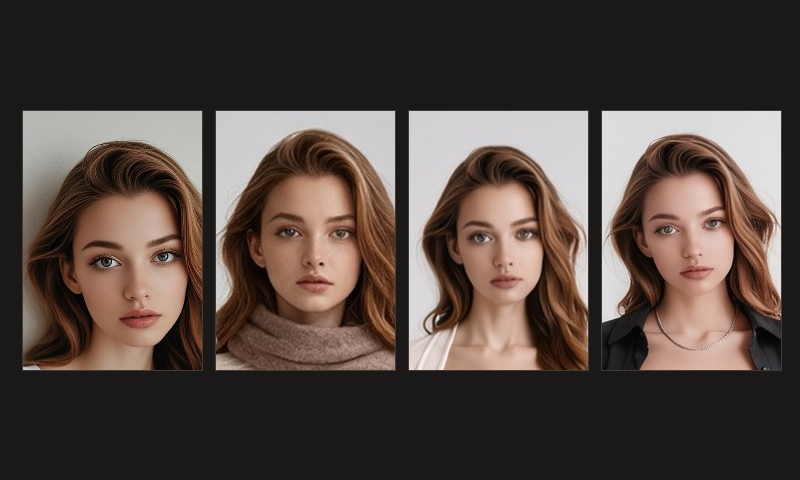
The most persistent flaw in generative portrait AI is identity drift: you ask the model for a relaxed full-body walk or an editorial seated posture, and it hands you back a generic, airbrushed AI face with alien cheekbones, misplaced eye distance, and flattened features.
In legacy workflows, creators were forced into one of two painful compromises:
- Custom LoRA Fine-Tuning: Gathering 15–30 high-resolution photos, renting cloud GPUs for 20+ minutes, and suffering from overfitted plastic skin that memorized original lighting backgrounds;
- 2D Post-Process Face Swapping (InsightFace / ReActor): Generating an arbitrary model's body, then pasting the user's face on top like a sticker — producing disastrous neck seams, mismatched lighting vectors, and "floating head" syndrome whenever the pose involves head rotation.
This article examines why standard diffusion inpainting fails due to the Denoising Dilemma, and how AIPose uses multi-reference conditioning to preserve your micro-facial features from a single neutral photo without training.
The Core Algorithmic Dilemma: Why ControlNet Inpainting Breaks Identity
Most advanced AI creators attempting pose changes with ControlNet OpenPose + Inpaint inevitably hit the Denoising Strength Dilemma:
Denoise ≤ 0.40 (Low Denoise)
Anatomical Fracture
Facial identity remains locked, but body joints cannot rotate. Forcing a side turn results in severe neck fractures and broken clavicles due to lack of latent inpaint latitude.
Denoise ≥ 0.65 (High Denoise)
Identity Drift
Limb posture bends fluidly along the skeleton, but the base model distribution takes over, completely replacing the subject with a generic synthetic AI face.
- Low Denoise (< 0.40): The latent space preserves original pixel noise structure. When OpenPose forces an angled shoulder while the source photo was front-facing, the model lacks latitude to redraw the sternocleidomastoid neck muscles, leading to severe anatomical fractures;
- High Denoise (> 0.65): The latent space is wiped clean. While limbs bend gracefully along the skeletal joints, standard text prompts cannot convey your exact nasolabial depth or philtrum curve. The base model's statistical average face inevitably takes over.
Macro Facial Evidence: 1 Neutral Photo Across 4 Stances & Lighting Conditions
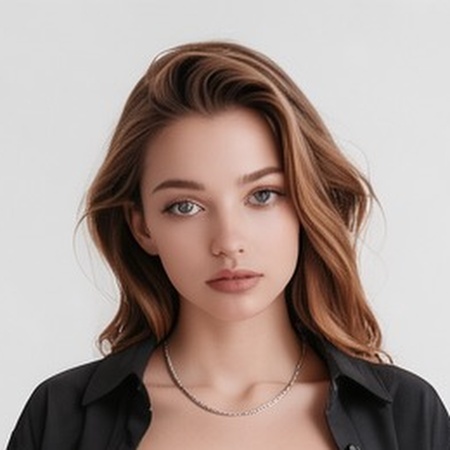
To verify likeness retention under extreme posture and lighting variations, we tested a single everyday smartphone selfie of Emma.
Below are 100% uncompressed micro-crops across 4 dramatically different postures, focusing on pupillary distance, nasal bridge shape, inner canthus symmetry, and jawline contours:
Biometric Crop Analysis Across 4 Distinct Postures
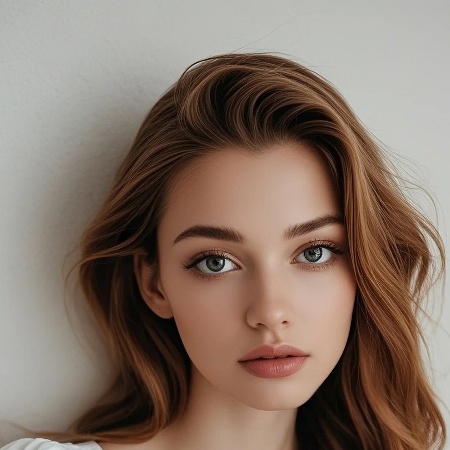 Input Baseline
01 · Source Selfie
Flat ambient indoor light, natural eyelid fold, organic skin texture.
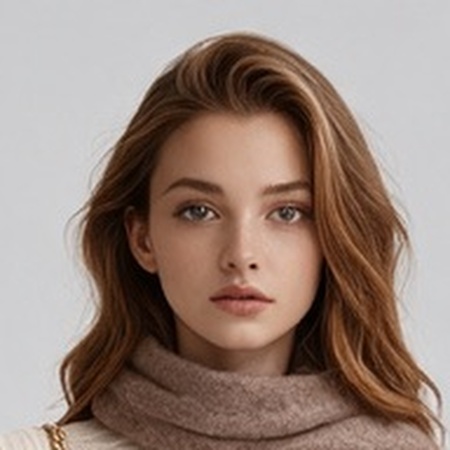 Pose A
02 · Lateral Tilt (12°)
Warm key lighting, soft cheek transition, identical inter-pupillary distance.
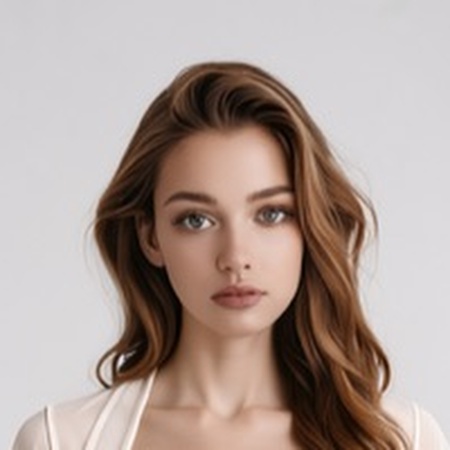 Pose B
03 · Soft Over-the-Shoulder
Diffused ambient light, preserved subtle smile curve and chin geometry.
 Pose C
04 · Editorial Directional Light
Hard architectural side light, sharp jawbone shadow with zero sticker blur.
Forensic Observation Focus: Compare the slight anatomical depression beneath the orbital bone and the subtle ridge along the upper nasal bridge. Where fine-tuned LoRAs tend to aggressively airbrush real facial structure into porcelain plastic, multi-reference conditioning preserves your individual facial identity.
Biometric Architecture Comparison: Multi-Reference vs Legacy Solutions
Here is how modern conditioning stacks up against traditional LoRA fine-tuning and 2D post-swap tools across forensic biometric criteria:
| Method | Identity Mechanism | Likeness Retention | Extreme Angle Stability | Neck & Jaw Continuity | Setup Overhead |
|---|---|---|---|---|---|
AIPose Multi-Reference | Multi-reference conditioning (source photo + pose reference) | High (source-photo anchored) | High (reference-driven framing) | Native (single unified render) | 1 photo, seconds-fast |
| Custom LoRA Model Training | Gradient descent on cross-attention weights | Medium–High (training-dependent) | Moderate (pose bias from training images) | Continuous, but prone to plastic sheen | 15–30 images, 20+ min training |
| InsightFace / ReActor (2D Swap) | 512-dim embedding affine warping | Low–Medium | Poor (severe distortion beyond 20° yaw) | High Risk (feathering seams & color halos) | 1 photo, ~20 seconds |
| Midjourney --cref | Global semantic reference soft-guidance | Low–Medium | High (often changes exact pose) | Clean, but frequently yields another person | 1 reference link, ~60 seconds |
Algorithmic Deep Dive: How Decoupled Conditioning Locks Identity
AIPose achieves pose freedom without facial deformation by decoupling Identity Embeddings from Spatial Skeletal Control inside the latent diffusion blocks:
- Source-Photo Anchoring: Rather than treating your face as a flat 2D patch to paste, your source photo anchors the facial structure — eye spacing, nose bridge slope, and the spatial relationship from outer eye corner to ear;
- Decoupled References: The pose reference drives body and framing, while your source photo keeps anchoring the face. Changing arm or torso articulation does not dilute facial fidelity;
- Unified Rendering: Ambient lighting from the new environment applies simultaneously to the cheeks, neck, and clavicle. Because skin is generated as one continuous surface in a single pass, no blend lines or feathering artifacts exist.
3 Practical Guidelines for Maximum Likeness Preservation
To get the highest fidelity from single-photo pose transformation, follow these input photo recommendations:
1. Disable Aggressive Beauty Filters & Smoothing
Smartphone beauty modes smooth away micro-capillaries, fine skin pores, and subtle nasal contours. AI needs these high-frequency details to lock onto a unique identity. A raw photo in clean natural light outperforms any heavily filtered selfie.
2. Avoid Heavy Eyewear or Forehead Obscurities
Chunky glasses frames, deep bangs covering the eyes, or thick turtlenecks hiding the chin line obscure the key facial landmarks. Clear sightlines of eyebrows, eye corners, and jawline ensure pinpoint locking.
3. Use Even, Frontal Diffused Lighting
Avoid extreme single-direction flash photography or harsh colored club lights in your source photo. Soft window light provides clean, uncorrupted base facial textures that adapt seamlessly to any target scene lighting.
Prompts for Realistic Skin Porosity & Micro-Expressions
When generating new postures in AIPose, use these focused prompt descriptors in the "Add details" box to maintain organic human warmth and skin fidelity:
Organic Skin Porosity & Micro-Texture
Sculptural Bone Structure & Clean Shadows
Candid Human Expression & Warmth
Frequently Asked Questions (FAQ)
Will the AI remove distinctive facial moles or dimples?
No. High-fidelity multi-reference conditioning treats personal characteristics (such as birthmarks, dimples, or distinct brow shapes) as primary identity anchors, preserving them across new poses.
Can I change my hairstyle while keeping the exact same face?
Yes. Simply specify your desired hairstyle in the prompt (e.g., styled in an elegant low bun or long beach waves). The network decouples hair volume from facial bone structure.
How do I try this for free?
Every new account automatically receives 12 complimentary studio credits upon registration (enough to generate a complete 4-pose discovery draft), with no credit card required.
Never Settle for Generic AI Faces Again
Upload 1 photo and change postures freely with zero training and seamless facial preservation.
Related guides
- How to Copy a Pose from One Photo to Another with AI (Step-by-Step)
A complete guide to cloning poses from Pinterest, Instagram, or editorial magazines onto your own photos using AI: transfer body postures with zero manual bone drawing while preserving 100% facial likeness.
Nov 5, 2026
- Lock a Pose, Change the Outfit: The 4-Draft AI Studio Workflow (2026 Guide)
A step-by-step walkthrough of generating multiple poses and outfits from one photo: the 4-draft discovery loop, locking mechanics, real credit costs, face consistency limits, and failed cases.
Nov 5, 2026
- How to Choose the Best Source Photo for AI Portraits (Fidelity & Camera Guide)
A complete guide to capturing or choosing the optimal source photo for AI pose changes: eliminating wide-angle lens distortion, preserving natural skin textures, and 4 rules for foolproof facial recognition.
Nov 1, 2026